Lesson 1: Introduction to the WordPress Dashboard
Goal
By the end of this lesson, you will be able to navigate the WordPress dashboard and identify where to perform common tasks safely.
Step 1: Accessing the dashboard
To access the WordPress admin area, add /wp-admin to your website URL and log in with your credentials.
Once logged in, you will see the main dashboard screen.
Step 2: Understanding the left menu
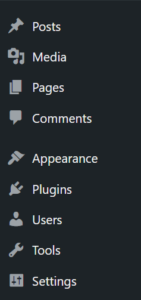
The left sidebar is the primary navigation area. Each section has a specific purpose:
- Posts: Used for blog content.
- Pages: Used for static website pages.
- Media: Stores images and uploaded files.
- Appearance: Controls themes, menus, and basic layout options.
- Plugins: Adds or removes site functionality.
- Users: Manages who can access the site and what they can do.
- Settings: Contains global site configuration.
Knowing where each action belongs helps avoid accidental changes.
Step 3: Performing a safe action
As a first practice:
- Go to Pages
- Open an existing page
- Make a small text change
- Use Preview before saving
This allows you to verify changes without affecting the live site.
Common mistakes to avoid
- Editing settings without understanding their impact
- Installing plugins unnecessarily
- Making multiple changes without previewing
Lesson takeaway
The WordPress dashboard is organized by function. Understanding where actions belong helps you manage your site confidently and reduce risks.